
WordPress: enrich your existing pages
Connect WordPress to read existing posts and deliver approved enrichment after consent.
The WordPress connector reads existing posts and pages and delivers approved enrichment to the exact page you selected. It does not build a new page. A live change requires the current revision, explicit confirmation, and recorded consent.
What you need
A WordPress user who can write posts, and an Application Password for that user. Generate the password in WP admin under Users then Profile then Application Passwords; it is separate from your login password. You will enter three things in Peithos: your site URL, your WordPress username, and that application password. Optionally set the post type, which defaults to posts but can be pages. Connecting requires a workspace admin.
Connecting WordPress
Open the WordPress card
In Peithos, open Settings, then Connections, and find the WordPress card. Connecting destinations is limited to workspace admins.
Enter your details
Provide your site URL, your WordPress username, and the Application Password. Select the post type that holds the existing page.
In Peithos- Settings
- Connections
- WordPress
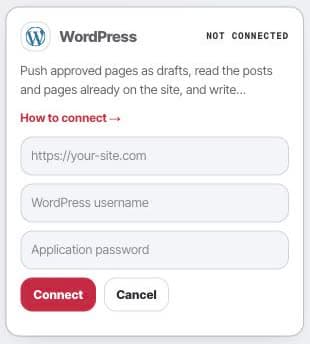
Open the WordPress setup card to enter the site URL, username, and application password. Validate and save
Peithos calls the WordPress REST API to confirm the credentials work and that the user can write, then saves. The application password is stored encrypted in our vault and is never displayed again.
What it does
Select the existing page and approve the enrichment revision. WordPress receives the approved code only after the deployment checks and current consent pass. Peithos reads the page back to check the installation and restores the prior content if WordPress stripped the required code.
WordPress also has a read lane. Peithos can read your existing posts and pages to find enrichment opportunities. WordPress has no separate draft layer for a surgical update to a published page, so a confirmed enrichment writes onto that exact page only after the current revision, shared checks, and consent pass. WordPress keeps a restorable revision. Nothing is written silently, and the copyable code remains available for manual installation.
Troubleshooting
- The connect button says denied. Connecting is limited to workspace admins. Ask a workspace admin to connect, or to make you an admin.
- The connection shows needs attention. The credentials did not authenticate. Regenerate the Application Password in WP admin and enter the new value.
- Peithos cannot reach the site. The site must be reachable over HTTPS from our servers. Check that the site URL is correct and that the REST API is not blocked.
Removing the connection
Open the WordPress card and click Disconnect. This removes the stored credential from our systems immediately and ends all further access. Drafts and any confirmed enrichment already written stay in WordPress because they are your content there; keep, edit, restore, or delete them as you like. Reconnecting later starts from a fresh set of credentials.
Common questions
- Does Peithos publish live posts on my site?
- An approved enrichment for an existing page can update that exact page live only after you explicitly confirm the update and the shared deployment checks and consent gate pass. Peithos never makes that live change silently.
- Where do I create the Application Password?
- In WP admin, go to Users then Profile and scroll to Application Passwords. Generate one for Peithos and paste the value into the connection form. It is different from your normal login password.
- Can Peithos read my existing WordPress content?
- Yes. WordPress can read back your existing posts and pages so Peithos can spot pages worth enriching. A confirmed enrichment updates only the selected existing page and leaves a restorable WordPress revision. Copy and manual installation remain available if you do not want a connected live update.
- What happens to WordPress content if I disconnect?
- Disconnecting removes the stored credential from Peithos so it can no longer reach your site. Drafts and any confirmed enrichment already written stay in WordPress; you can keep, edit, restore, or delete them there.