
Google Search Console: real ranking signal
Google Search Console is coming soon while Google verifies the read-only connection. See the exact ranking signals it will provide.
The Google Search Console connector is read-only measurement. It reads your exact per-page rankings, impressions, clicks, and the queries you show up for, so Peithos knows which pages already rank and can avoid enriching a page that is already winning. It connects through Google with the read-only Search Console scope and never changes anything.
What you need
A Google account with a verified Search Console property for your site. Search Console only returns data for properties you own and have verified, so the property must already be verified before you connect. Connecting requires a workspace admin.
Connecting Google Search Console
Open Connections
In Peithos, open Settings, then Connections, and find Google Search Console. Connecting is limited to workspace admins.
Continue to Google Search Console
Choose Continue to Google Search Console on the connector card. Peithos then opens Google's own consent screen.
In Peithos- Settings
- Connections
- Google Search Console
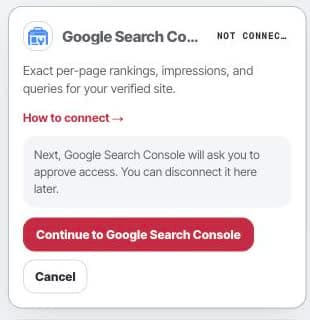
Open Settings, then Connections to start the read-only Search Console connection. Approve and return
Google lists the read-only Search Console access Peithos requests. Peithos never sees your Google password. After you approve, Google sends you back connected and the offline token is stored encrypted in our vault.
What it does
Peithos reads your exact per-page rankings, impressions, clicks, and the queries you show up for. That tells it which pages already rank, so it can avoid enriching a page that is already winning. The connection is read-only; it never changes anything in Search Console.
Troubleshooting
- The connect button says denied. Connecting is limited to workspace admins. Ask a workspace admin to connect, or to make you an admin.
- No property to choose. You must have a Google account with a verified Search Console property for your site. Verify the property in Search Console first.
- The connection shows needs attention. The Google grant was revoked. Reconnect from Connections to reauthorize.
Removing the connection
Open the Google Search Console connection and click Disconnect. This revokes the grant at Google and deletes the stored token from our systems immediately, ending all further access in one step. Reconnecting later starts a fresh authorization from the beginning.
Common questions
- Does Peithos change anything in Search Console?
- No. The connection is read-only. Peithos reads your rankings, impressions, clicks, and queries. It never edits, submits, or changes anything in Search Console.
- What does Peithos do with the data?
- It reads your exact per-page rankings and the queries you show up for, so it knows which pages already rank and can avoid enriching a page that is already winning.
- Why do I need a verified property?
- Search Console only returns data for properties you own and have verified. You need a Google account with a verified Search Console property for your site before connecting.
- What happens if I disconnect?
- Disconnecting revokes the grant at Google and deletes the stored token immediately, so Peithos can no longer read your Search Console data.