
Shopify: catalog and product schema
Read your Shopify catalog and deliver approved video schema to an existing product page.
The Shopify catalog connection reads product truth and delivers approved video schema to an existing product page through product metafields. Shopify Blog is a separate compatibility transport; it is not automatic exact-page enrichment and Peithos does not build customer pages.
What you need
A Shopify Admin API token with Products read and write access, your myshopify.com store domain, and a workspace admin to connect the catalog. The schema reaches the storefront only after your product template includes the one-time theme snippet from Settings.
Connecting Shopify
Open the Shopify catalog card
Stay in Connections, then find Shopify catalog under Store catalogs. This connection is separate from the legacy blog transport.
Enter your catalog details
Paste the myshopify.com store domain and an Admin API token with the Products read and write scope.
In Peithos- Settings
- Connections
- Shopify catalog
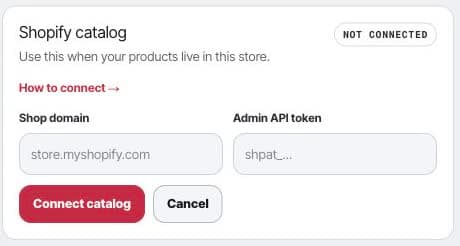
The separate store catalog connection grounds product truth and supports product schema write-back. Save the catalog connection
Peithos validates the store before saving the token encrypted and reading the product catalog.
Legacy Shopify Blog connection
- Settings
- Connections
- Shopify
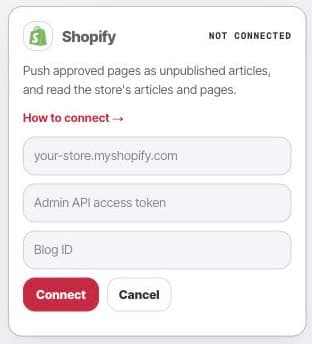
What it does
Shopify Blog is a legacy general-publish transport. For an existing article, install the approved enrichment manually or through your own implementation. The catalog connection below targets existing products and does not use that blog lane.
Catalog and schema delivery.Peithos reads your product catalog, which is SKU-authoritative, to ground product truth, and can write a video's structured data into a product metafield in the framesite namespace under the key video_schema, with the visible video block under the key video_block. A small one-time theme snippet, placed in the product template where the block should show, renders both server-side, so the product page carries the schema and the block. A store that added the snippet before the block was written needs the current snippet from Settings. Each write requires the exact approved revision and recorded consent; a saved metafield is not proof the public page renders it.
Troubleshooting
- A 403 on schema write-back. The token is missing the Products modify scope. Update the Custom App to grant Products read and write, then reconnect.
- The token does not work. An Admin token only works against your own myshopify.com store. Confirm the store domain matches the token.
- The connect button says denied. Connecting is limited to workspace admins. Ask a workspace admin to connect, or to make you an admin.
Removing the connection
Open the Shopify card and click Disconnect. This removes the stored token from our systems immediately and ends all further access. Blog articles you already published and metafields already written stay in Shopify until you remove them yourself. Reconnecting later starts from a fresh token.