
HubSpot: enrich existing content and ground Iris
Deliver enrichment as a draft edit to existing HubSpot content and read permitted CRM signals.
The HubSpot connector links your HubSpot account to Peithos so approved enrichment can be delivered as draft edits to your existing HubSpot content, and so Peithos can ground its work in your real CRM signals. Anything Peithos writes to HubSpot is a draft; nothing goes live until you and your client approve it and publish it inside HubSpot.
What you need
- A HubSpot account.
- For enrichment, an existing HubSpot blog post, site page, or landing page you can edit.
- A HubSpot admin to approve the connection.
Connecting HubSpot
Open Connections
Sign in to Peithos, open Settings, then Connections. The HubSpot card sits with the other destinations. You need a workspace admin role to connect accounts.
Click Connect HubSpot
You are sent to HubSpot's own consent screen. It lists exactly what Peithos asks for: blog content, and read of contacts, deals, and forms. Peithos never sees your HubSpot password.
In Peithos- Settings
- Connections
- HubSpot
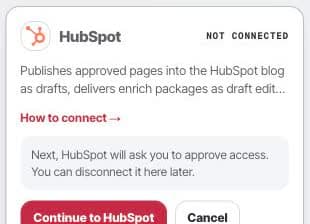
Open the HubSpot setup card to connect publishing and CRM grounding for the right portal. Approve and return
After you approve, HubSpot sends you back to Peithos and the card shows Connected. Peithos auto-detects your blog at connect and stores an encrypted offline token, used only on our servers and never shown back to you.
What it does
The HubSpot connection works two ways: it writes drafts you approve, and it reads to ground Iris's understanding of your business.
- Write. Peithos can deliver enrichment (structured data) as a draft edit to an existing HubSpot blog post, site page, or landing page. It never pushes anything live; every change stays a draft for you to publish in HubSpot.
- Read. Peithos reads your existing HubSpot pages to find enrich opportunities, and reads CRM signals (contacts, deals, and forms) to ground its understanding of your business. Nothing from the CRM is published.
Troubleshooting
- The connect button says denied. Connecting is limited to workspace admins. Ask a workspace admin to connect, or to make you an admin.
- Publishing is blocked. If no blog is selected, publishing is blocked with a clear message. Check the selected content and the connection permissions before trying again.
- The connection shows needs attention. This means the connection needs reconnecting. Click Connect HubSpot again to reauthorize; your existing drafts are unaffected.
Removing the connection
Open the HubSpot card and click Disconnect. This deletes the stored token from our systems immediately and stops all further access. Drafts you already created stay in HubSpot, because they are your content there. Reconnecting later starts a fresh authorization from the beginning.
Common questions
- Does connecting HubSpot publish anything live?
- No. Anything Peithos creates in HubSpot is a draft. Enrichment lands as a draft edit to an existing post or page. It stays a draft until you review and publish it in HubSpot yourself.
- Is my HubSpot CRM data published on my site?
- No. Peithos reads CRM signals such as contacts, deals, and forms only to ground its understanding of your business. Nothing from the CRM is ever put on a published page.
- Is the HubSpot connector public in the Marketplace?
- Not yet. HubSpot is available in workspaces where Peithos's private app is enabled, but the public Marketplace listing has not been submitted.
- What happens to my data if I disconnect?
- Disconnecting deletes the stored token from our systems immediately and stops all further access. Drafts you already created stay in HubSpot, because they are your content there.